Your 30-Second Summary
Most teams don’t realise how time-consuming managing incoming emails can be. There’s a better way to handle this that involves moving away from manual effort to an AI-driven automated system. In this blog, you’ll learn:
• What digital mailroom automation means
• The real benefits, not limited to reducing costs
• How it works in practice (with a real implementation)
For most businesses, digital mailroom management isn’t exactly the star of the show. It handles countless documents that keep operations moving. But it’s often also one of the most manual and error-prone parts of the workflow.
That’s precisely the kind of inefficiency digital mailroom automation is built to eliminate. As companies push for faster processes and better visibility into their operations, the way incoming documents are handled is getting a serious upgrade.
This isn’t a passing trend. The global digital mailroom services market is expected to grow from around $1.5 billion in 2025 to nearly $2.8 billion by 2034.
The days of manual sorting and constant data entry are giving way to digital mailroom automation services, and in this blog, we’ll unpack what this looks like on the ground.
What is Digital Mailroom Automation?
Most teams across different departments rely on shared inboxes to manage new requests. As more emails come in, these inboxes quickly become chaotic. Messages pile up, threads collide, and responsibility isn’t always obvious.
Automated digital mailroom operations are all about handling incoming business emails in a more structured, intelligent way, without relying on people to manually read, sort, and forward everything.
Each email landing in the shared inbox is converted into a digital format right at the point of entry. Then, AI-powered systems step in to:
• Read the document
• Understand what the content is about
• Extract critical business information
• Trigger the next step
Instead of waiting to be processed, emails are automatically picked up, understood, and routed.
Why Is Automated Digital Mailroom Important? Key Benefits Explained
The biggest impact of digital mailroom automation software isn’t just speed; it’s what happens when you fix the entry point of your workflows. When incoming emails are handled manually, every downstream process inherits that inefficiency. Automation changes this at the source. This is how.
1. It Removes the Invisible “Triage Layer”
In most teams, a surprising amount of time goes into figuring out what an email is about and who should handle it. This invisible triage step, reading, interpreting, and forwarding, isn’t officially tracked, but it slows everything down. Automation eliminates that layer by classifying and routing emails as they come in, so work starts where it should.
2. It Reduces Dependency on Individual Context
Manual inbox management often relies on a few people who “just know” how to handle certain emails. Over time, this creates knowledge silos. With automation, this business decision-making is systemised. Emails are handled based on rules and learned patterns, not individual familiarity.
3. It Shortens the Gap Between Intake and Action
There’s often a delay between when an email comes in and when someone picks it up. Not because teams are slow, but because prioritisation is manual. Automation reduces that gap significantly by triggering workflows the moment an email is received and understood.
4. It Brings Consistency to How Work Enters the System
The way a request is handled can vary from person to person. Some people may forward it with all the necessary context. Others might include minimal supporting details. Automation evens this out, ensuring each mail is processed consistently before moving ahead.
5. It Scales Decision-Making, Not Just Processing
This isn’t just about handling more emails. It’s about handling them better at scale. As volume increases, the system continues to classify, extract, and route with the same level of accuracy, something that’s hard to maintain with purely manual effort.
How to Implement Automated Digital Mailroom?
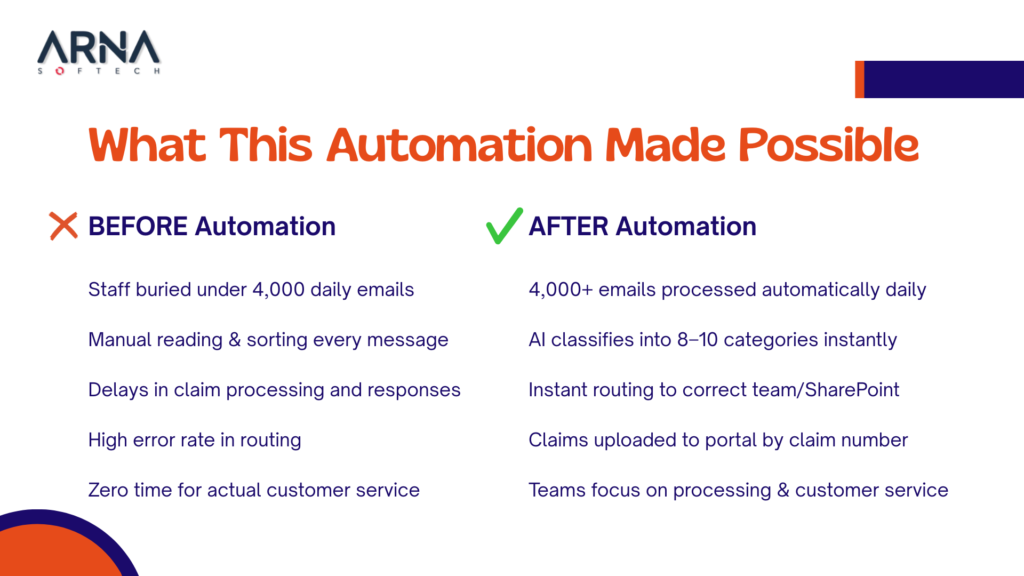
The easiest way to explain this is through what we actually built for an insurance client. This client had a shared inbox receiving over 4,000 emails a day. Every single email was intercepted, sorted, and forwarded to the right team manually.
So instead of trying to “manage” that inbox better, we redefined how emails were processed right from the start. We created an AI-powered digital mailroom layer that sits between the client’s shared inbox and their internal systems. This layer takes over the entire intake and routing process. Rather than people managing the inbox, the system does it for them.
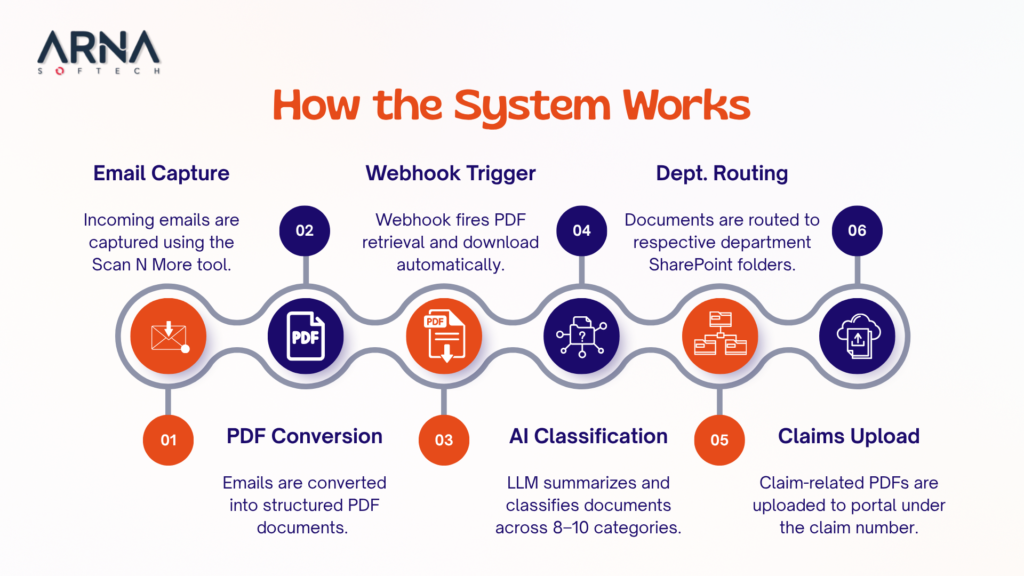
Here’s how that plays out step by step:
1. The inbox becomes a source of input. Every incoming email is automatically picked up by the system the moment it arrives.
2. The system standardises everything into a consistent structure. This allows all emails to be handled consistently, regardless of format.
3. Now the content is ready to be interpreted and classified by AI. The LLM identifies the intent and organises it across multiple categories instantly.
4. The system decides what needs to happen next based on the classification. There’s no manual forwarding or follow-up needed.
• If it’s a claim-related document, it gets pushed into the claims system with the right reference.
• If it belongs to a specific team, it’s routed directly to their workspace.
5. Each email reaches the right destination with the right context attached. By the time a team looks at it, the sorting and interpretation are already done.
What this digital mailroom automation software changes is the role of the inbox, turning it into a system that continuously distributes work in the background.
Wrapping Up
What we’ve seen work is that once the intake of incoming emails is handled properly, everything downstream gets easier. This means fewer delays, clearer ownership, and less back-and-forth. It’s not about over-engineering the process. It’s about clearing the parts of the process that just create drag.
Does your digital mailroom feel harder to control? Reach out to learn how an AI-supported process can work for your business.
What are the Core Components of a Digital Mailroom System?
A digital mailroom system usually has four key parts:
• Capture – automatically picks up incoming emails and attachments
• Processing – AI reads, understands, and extracts key information
• Decision and Routing – determines what the email is and where it should go
• Integration – connects with internal systems like CRMs, workspaces, portals, workflows, folders, etc.
How Do Digital Mailroom Automation Systems Improve Mail Handling Efficiency?
They remove the need for manual triage of opening, reading, and forwarding emails. The real efficiency gain comes from two things:
• Speed – no delays at the intake stage
• Consistency – every email is handled the same way, with fewer errors and rework
What are the Benefits of Automating Document Intake Processes for Businesses?
The main benefits of document intake automation include:
• Emails and documents are handled as they arrive
• Teams don’t spend time sorting and reading everything
• Reduces chances of misrouting or missed requests
• Gives a clearer view of what’s coming in and where it’s going
• Ensures that incoming information is actionable