Your 30-Second Summary
This blog looks at cloud migration from a data perspective. Because data carries dependencies, context, and risks that don’t move neatly. Inside this guide, you’ll learn:
• How to define your data landscape
• Where data migrations typically go wrong
• A stage-wise data migration checklist you can follow
• How data engineering solutions keep things stable
If your data had to move to the cloud soon, how sure are you it wouldn’t get lost or exposed along the way?
That’s not a hypothetical question. For most businesses, cloud migration is either already happening or right around the corner. While it’s often positioned as a smooth upgrade with lower costs and faster systems, the reality is more layered. Because the moment your data starts moving, so does your risk.
Cloud is not just a new location. It is a different way of managing data altogether. If you approach the security with the same mindset as that of your current systems, you are likely leaving blind spots.
The real question is: do you have security-focused data engineering solutions in place to support the data transfer?
Because security cannot be something you check at the end. It needs to be part of every decision. In this blog, we’ll understand data safety when migrating to the cloud by looking at three key phases:
• What you need to secure before migration
• What to focus on during the migration
• What to validate and monitor after the move is complete
Defining Your Migration Scope
Before you even begin the migration, you must know the extent of data that’s to be migrated. If you get this part right, everything that follows becomes easier. If you get it wrong, every step after this becomes reactive. This step builds the foundation of a safe migration.
1. What Types of Data are Involved?
• Structured data:
This is your organised data. Databases, tables, transactional records. Easier to move, but still needs validation and consistency checks.
• Unstructured data:
Files, emails, documents, media. Ownership is unclear and duplication is common here.
• Sensitive data:
Customer information, financial records, internal business data. It needs stricter controls and careful monitoring during migration.
2. Where is Your Data Now and Where is It Going?
Get a clear picture of:
• All the source systems your data currently sits in
• The dependencies between those systems
• The destination environments you are moving to
3. What Actually Matters and What Doesn’t?
Here’s a question most teams avoid asking. Do you need to migrate everything?
The honest answer is usually no.
Some data is critical. It directly supports operations, decision-making, or customer experience. This needs priority, accuracy, and zero compromise on security. Some data is non-critical. Old logs, unused files, redundant backups. Moving this adds cost, complexity, and risk without real value.
The more unnecessary data you migrate, the harder it becomes to secure, validate, and manage everything else.
What Are Some Risks in Cloud Data Migration?
These risks aren’t unusual. They often come from small gaps rather than major mistakes.
• Data corruption: Without proper validation, data can get changed, duplicated, or even lost during transfer.
• Unauthorised access during transfer: If data isn’t secured during transfer, it becomes vulnerable. Weak controls or open channels can lead to exposure.
• Business disruption: If the migration is not backed by proper planning, you risk downtime. This can hamper your operations as well as your team members.
• Legal concerns: When confidential information isn’t managed properly, it can create serious legal and financial problems.
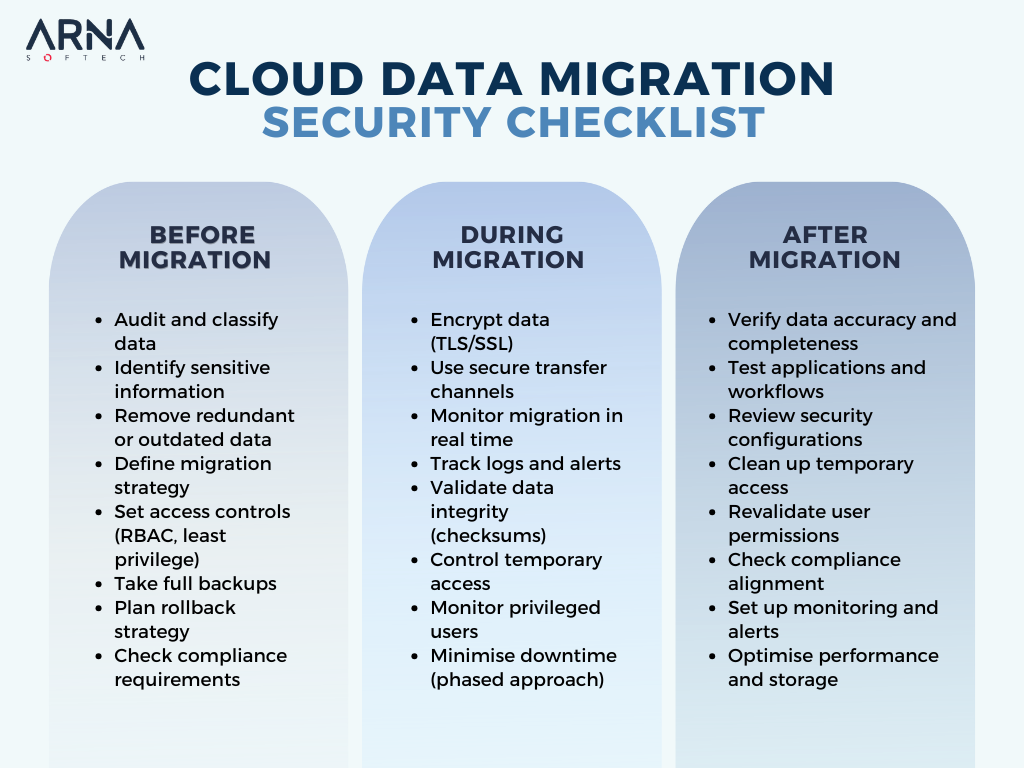
Pre-Migration Checklist
Here’s what you should lock in before moving any data. The migration would feel far more controlled and predictable, as a result.
1. Data Audit and Classification
• Group your data based on importance. The idea is to understand what data is urgent to move and what isn’t.
2. Choose Migration Approach
Your options include:
• Lift-and-shift moves data as it is. The changes to the existing setup are minimal.
• Re-architecting involves restructuring data and systems for the cloud.
• A Hybrid approach refers to a mix of both.
3. Access Control and Identity Management
Not everyone needs access. Figure out who does and keep it limited to them. Use role-based access and avoid giving more access than required, especially during migration.
4. Backup Planning
Create full backups of your data and test them. More importantly, define a rollback plan. If something fails midway, you should know exactly how to recover without scrambling.
5. Compliance Readiness
Ensure your migration approach follows requirements based on your industry. Like GDPR, HIPAA, or PCI-DSS. Also consider data residency rules, especially if your data needs to stay within specific regions.
During Migration Checklist
The goal here is simple. Keep visibility high, access controlled, and data protected at every step.
1. Data Encryption in Transit
Data should never travel in an unprotected state. By using secure protocols such as TLS or SSL, you can ensure it stays protected while it moves between systems. This reduces the risk of interception between systems.
2. Real-Time Tracking
You should be able to check at any time how the migration is moving ahead. Logs and alerts can help here. This way, you can step in if something doesn’t look right.
3. Data Integrity Validation
Use checksums or hash validation to verify that data has not been altered or corrupted during transfer. Else, you may not realise something is wrong until much later.
4. Controlled Access During Migration
Migration often requires temporary access, and that is where risks increase. Define temporary access policies, limit permissions, and actively monitor privileged accounts. Make sure no unnecessary access is granted during this phase.
5. Minimising Downtime and Business Impact
Migration should not disrupt your operations. Use a phased approach or run parallel environments where possible. Moving data in stages gives you the chance to test along the way and ensures that users and systems aren’t heavily impacted.
Post-Migration Checklist
Here’s what you need to validate once your data is in the cloud.
1. Data Validation and Testing
First, confirm that everything made it across correctly. Check for completeness and accuracy. Are all records present? Has anything changed or gone missing?
Also test at the application level. Systems and applications that rely on this data should function exactly as expected. If something feels off, this is where you catch it early.
2. Security Configuration in Cloud
• Review firewall rules and network security groups
• Check storage settings for any gaps
• Restrict access to only what’s necessary
• Avoid leaving anything open or exposed by default
3. Access Review and Cleanup
During migration, temporary access is often granted. Now is the time to clean that up. Remove any temporary permissions and recheck user roles. Ensure everyone can access only what they need.
4. Compliance Verification
If your data follows regulations:
• Make sure everything is still compliant
• Check audit trails
• Review logs and reports
Take a quick look to ensure your setup meets the standards and nothing slipped through during the move.
5. Performance and Monitoring Setup
Set up alerts and monitoring tools to track:
• Performance
• Usage
• Potential issues
Also look at optimising storage and access patterns so your systems run efficiently in the new environment. More than just checking performance, this is also when you should be checking how effectively you can use migrated data for analytics, like improving customer experience analytics and understanding user behaviour more clearly.
Why Data Engineering Solutions Matter for Secure Migration
At this point, you’ve seen what needs to be done before, during, and after migration. So what brings all of this together? It comes down to data engineering solutions. They bring structure, consistency, and control to your data across the entire process.
For example:
• Ensuring data is standardised and usable, not just transferred.
• Maintaining consistency across systems, so dependencies don’t fail.
• Making it easier to track, validate, and monitor data as it moves and evolves.
• Ensuring your data doesn’t get fragmented across systems after the move, thanks to cloud data integration.
Without a strong data engineering layer in place, migration can still be completed. But you are far more likely to deal with broken workflows and security gaps that show up later.
Final Takeaways
By now, one thing should be clear. There is no single step that makes your data migration “secure.” It’s a series of decisions:
• What you choose to move
• How you prepare it
• How you handle it in transit
• What you validate after it’s done
At the end of the day, it all comes down to how your data is managed behind the scenes. Because it ensures your data doesn’t just reach the cloud, but continues to work the way it should.
If you’re planning a cloud migration and want to get this right from the start, let’s talk. We’ll help you design data engineering solutions that support it end to end.
What is a Data Engineering Solution?
Raw data is often scattered and unreliable. With a data engineering solution, it becomes structured and ready to support real business decisions.
What are the 4 Pillars of Data Engineering?
The pillars of data engineering refer to:
• Ingestion
• Storage
• Processing
• Serving
When these pillars are strong, your data remains reliable and accessible.
Will AI Replace ETL?
ETL is still essential for moving and preparing data. AI can automate parts of ETL, like data cleaning and error detection. But the need for ETL itself is not going away.