Your 30-Second Summary
Most teams try to fix customer experience issues at the surface level. But many times, the real problem sits deeper, in how data is being handled across systems. Until that’s fixed, the same issues tend to keep coming back.
This blog covers:
• How data issues show up in everyday user experience
• The role data pipelines play in shaping user interactions
• What improves when those pipelines are fixed
What looks like a “bad user experience” is, more often than not, a data problem behind the scenes. Delayed updates, inconsistent information, or missing insights usually trace back to how data is being collected, processed, and delivered.
That’s where data pipelines come in, and more importantly, where data engineering consulting starts to make a real difference. These pipelines may not be visible to users, but they impact every interaction behind the scenes.
In this blog, we’ll look at how the right data consulting approach can clean up and streamline your data pipelines, and how that directly translates into better customer experiences and higher engagement.
What Are Data Pipelines?
You can think of a data pipeline like a delivery system.
• Data is picked up from different sources
• It’s sorted and processed along the way
• Finally, it’s passed on to the systems that require it
Every time a user takes an action, clicks a button, makes a transaction, updates a profile, the data moves through a series of steps in the background. That’s what a data pipeline is.
Here’s what a typical data pipeline is doing, step by step:
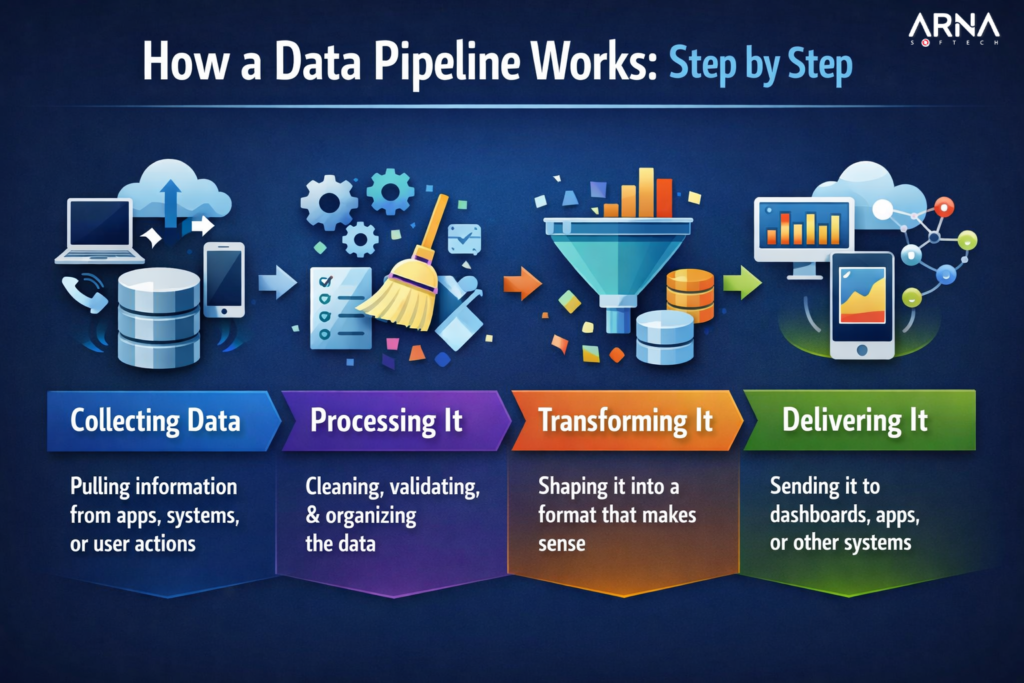
If everything runs smoothly, the delivery is fast and accurate. If not, things get delayed, lost, or show up incorrectly.
How Poor Data Pipelines Break Customer Experience
Many everyday user frustrations like the following actually come from data issues.
• Delayed Experiences
If things aren’t updating in real time or take too long to load, users notice. That delay, whether it’s a dashboard, status update, or notification, comes from slow data movement. Even a small slowdown can hurt the experience.
• Inconsistent Data
Nothing breaks trust faster than seeing different information in different places. When data isn’t synced properly, users start questioning what’s accurate, and that doubt sticks.
• Lack of Personalisation
If everything feels generic, it usually means your data isn’t being used well. Without clean, connected data, personalisation becomes guesswork, and users can tell.
• System Breakdowns at the Worst Time
Things could be working fine until they suddenly don’t. Traffic spikes or heavy usage can expose weak pipelines, leading to crashes or failed actions right when users need things most.
• Slow Customer Support
When users reach out, they expect quick answers. If teams don’t have the latest data in front of them, resolving even simple problems can take way too long.
What Good Data Flow Looks Like for Your Users
When your data pipelines are working the way they should, with the right data engineering consulting behind them, you can feel the difference in how smooth everything becomes. Here’s how you see this in action:
1. Things Happen in Real Time
Users don’t have to wait around for updates. Actions reflect instantly, and everything feels in sync.
How this plays out:
• Updates happen immediately
• Dashboards feel live, not delayed
• Users stay engaged instead of refreshing again and again
2. Information Feels Reliable
Users stop questioning what they’re seeing. There’s no confusion, no mismatch, just clarity.
How this plays out:
• Same data across all touchpoints
• Fewer errors or missing information
• Stronger trust in your product
3. Smoother Journeys, Not Just Faster Screens
Speed alone doesn’t fix the experience; how everything connects matters more.
How this plays out:
• Users don’t hit dead ends or mismatched steps
• Information carries forward smoothly
• Flows feel complete, not broken
4. Easy to Follow
When data is clear, users understand it instantly. The experience makes sense without extra effort.
How this plays out:
• Easy-to-understand information
• No need to cross-check or verify
• Users move faster without thinking too hard
5. Fewer “Restart” Situations
Nothing frustrates users more than having to redo something. Broken or incomplete data flows often force users to repeat actions.
How this plays out:
• Progress is saved properly
• Actions don’t get lost midway
• Users don’t have to retrace steps
6. Easier Recovery When Something Goes Wrong
You might still face system issues here and there. But with strong data pipelines, it’ll be easier to overcome them and stay on track.
How this plays out:
• Errors don’t lead to dead ends
• Issues feel manageable, not chaotic
• The system responds instead of freezing or failing
7. Getting the Timing Right
Speed alone isn’t enough; timing matters just as much. Good data pipelines make interactions feel well-timed, not rushed or delayed.
How this plays out:
• Notifications arrive when they’re useful
• Updates don’t feel too early or too late
• Interactions feel naturally timed
We’ve Seen This Work Firsthand
This is something we’ve actually worked through with a manufacturing client. Their reporting was slow and scattered because the underlying data wasn’t moving properly. Through our data engineering services, we fixed how that data flowed across systems, and with the right data visualisation services, made the output far clearer and more usable. You can check out the full case study to see how this came together.
How Does Data Engineering Consulting Work?
Here’s the simplest way to understand it. The process starts with reviewing how data is flowing currently and where it’s breaking down. The next step is making that flow simpler and easier to trust.
How Long Does It Take to Clean Up Data Pipelines?
There’s no fixed timeline. It comes down to how things are set up today. Smaller fixes can be done in a few weeks, whereas bigger ones usually take more time. Most teams tackle it in phases.
Do Better Data Pipelines Reduce Customer Complaints?
Yes. Once data pipelines are fixed, a lot of the usual issues, like delays in updates and errors in data, start to go away, and the experience feels much smoother.