Your 30-Second Summary
Finance teams are busier than ever, but are they working at their highest level? Being busy doesn’t always mean being effective. If you’re rethinking how finance should run, this is your starting point. We’ll cover:
• Why familiar processes feel safer than they are
• Where process-heavy work eats into performance
• The operational and strategic risks that add up over time
• The building blocks of an automated finance function
• A real case of invoice workflow automation implemented
If you tracked how your finance team spends its time, the results might be surprising.
Not on analysis. Not on forecasting. Not on risk strategy.
But on repetitive tasks. Manual checks. Fixing small mismatches. Following up on approvals. Individually, these tasks feel manageable. But together, they slowly reduce overall team productivity.
And here’s the real concern: it only gets worse as your business grows.
Finance workflow automation isn’t an efficiency trend. It cuts out the monotonous tasks that distract your team from important work.
Before we talk about solutions, let’s address this: why does finance hold on to manual processes?
The Comfort Trap: Why Finance Teams Stick to Manual Processes
For many finance teams, manual financial workflows aren’t a flaw; they just happen to be familiar.
Spreadsheets, email approvals, shared folders, and manual reconciliations. These have served as the backbone of finance for years. And because they’ve “always worked,” there’s an unspoken assumption that they’ll continue to work.
Let’s understand why even forward-thinking finance leaders hesitate when it comes to automation of finance processes.
• Familiarity Feels Like Control
When teams touch every invoice, manually verify every entry, and personally follow up on approvals, it feels controlled. It feels safe.
But that sense of control is often psychological, not structural.
In reality:
• Manual oversight increases dependency on individuals
• Processes lack standardisation across teams and geographies
• Errors are detected reactively rather than prevented proactively
• Tendency to Play It Safe
Unless something is visibly failing, like a major compliance issue or a financial loss, any major change feels unnecessary to finance leadership.
But inefficiency doesn’t always present itself with dramatic outcomes. It can work in more subtle ways, draining:
• Team productivity
• Decision speed
• Reporting accuracy
• Strategic bandwidth
Because the damage is gradual, urgency never builds.
• Assuming Automation Is Just IT
Another reason manual processes persist?
Automation is often perceived as:
• Technical
• Complex
• IT-owned
• Expensive
When in reality, modern finance automation is a strategic advantage for CFOs.
It enables changes like:
• Transaction processing → Strategic decision support
• Reactive reporting → Real-time insight
• Manual oversight → Built-in governance
As is evident, a finance department doing things manually may look stable at first glance. But for most finance leaders, stability isn’t the only goal worth chasing. They expect efficiency, transparency, and scalability too. That’s when finance workflow automation becomes unavoidable.
The Common Drains You’re Not Noticing in Finance
Following are some financial work areas where productivity is usually wasted, and where automated processes can have a significant impact.
Repetitive Data Entry Across Systems – Entering the same numbers into multiple platforms, like ERP systems, spreadsheets, reporting tools, etc. It’s time-consuming and error-prone.
Compliance Checks – Manually checking policy adherence takes up time and increases the chances of mistakes as transaction volume grows.
Email-Based Approvals – Approvals sitting in inboxes slow everything down. There’s no easy visibility into pending requests.
Monthly Financial Reconciliations – When reconciliations are manual, errors pile up and get fixed at the last minute. Close cycles become stressful and unnecessarily long.
Spreadsheet Consolidation – Pulling data from different teams and merging versions manually turns reporting into a coordination exercise instead of an analytical one.
The Real Price of Manual Finance Workflows
Here’s what manual operations are really costing you. The cost may not be listed as a single line item on your balance sheet, but it’s there. It’s just scattered across time, talent, risk, and growth.
1. Inconsistent Process Execution
When financial processes rely heavily on human intervention, consistency varies. Two similar transactions may be handled differently. Controls depend on experience rather than system rules. That variability increases operational risk as teams grow.
2. Compliance and Audit Risk
Manual approval workflows and email-based documentation create gaps in traceability. Audit requests shouldn’t turn into a search for missing documents. Weak process documentation increases compliance exposure, especially as regulations tighten.
3. Reputation and Credibility Risk
Repeated financial reporting delays, inconsistencies, or late disclosures impact leadership credibility. Finance is expected to be the most reliable function in the organisation. Manual instability weakens that perception internally and externally.
4. Scaling Means Adding Headcount
When processes are manual, growth usually requires more people to handle more transactions. That means:
• Higher operational cost
• Larger teams to manage
• Increased coordination complexity
5. Strategic Blind Spots
When finance is too consumed by routine manual tasks, there’s less time for:
• Scenario modeling
• Risk analysis
• Performance optimisation
• Forward-looking planning
And that limits the role finance can play in driving business growth.
Inside an Automated Finance Workflow
When automation in the finance industry is implemented properly, the workflow feels clearly sequenced and predictable. These are the characteristics of a truly automated finance environment.
• End-to-End Digital Processes
In an automated workflow, a transaction doesn’t jump between emails, files, and systems.
From initiation to validation to posting, the entire process flows within a connected digital environment. Every step is structured. Every handoff is tracked. Automating finance processes removes delays and disconnects between different stages.
• Role-Based Approvals
Approvals shouldn’t depend on who happens to see an email first. A structured system routes transactions automatically based on predefined roles, limits, and responsibilities. Large payments are routed to senior oversight. Policy exceptions are escalated automatically.
• Built-In Audit Trails
Every action leaves a record. Who initiated the transaction. Who reviewed it. What changed. When it changed. Instead of reconstructing history during audits, the documentation already exists, structured and accessible.
• Anomaly Detection Using AI
The system doesn’t wait for someone to notice issues. Rather, it continuously monitors patterns. It automatically flags unusual transactions, duplicate payments, unexpected vendor activity, or anything that doesn’t match past patterns.
• Cloud-Based Visibility
Modern finance leaders need access to real-time financial data, not static reports. Cloud-based platforms provide centralised dashboards accessible across entities and locations. Leadership can monitor performance, cash flow, liabilities, and key metrics live as transactions are processed.
Automating Invoice Migration — A Practical Example
A client’s finance team was manually transferring invoice records from SharePoint into their internal application. It required careful checking, constant attention, and left little room for error.
We fixed this by building a controlled Power Automate workflow that restructured the process entirely. Now the automated invoice migration process looks like this:
• The process starts with a user trigger from SharePoint.
• Before any data moves, the workflow validates key fields. If something is missing, the invoice is flagged as “Not Eligible” with a clear correction message.
• Once validated, the system securely transforms and transmits the data via API.
• Successful migrations update the invoice status and application invoice ID, while failures log precise error messages for correction.
• Every migration attempt is recorded with timestamps and outcomes, creating a full audit trail.
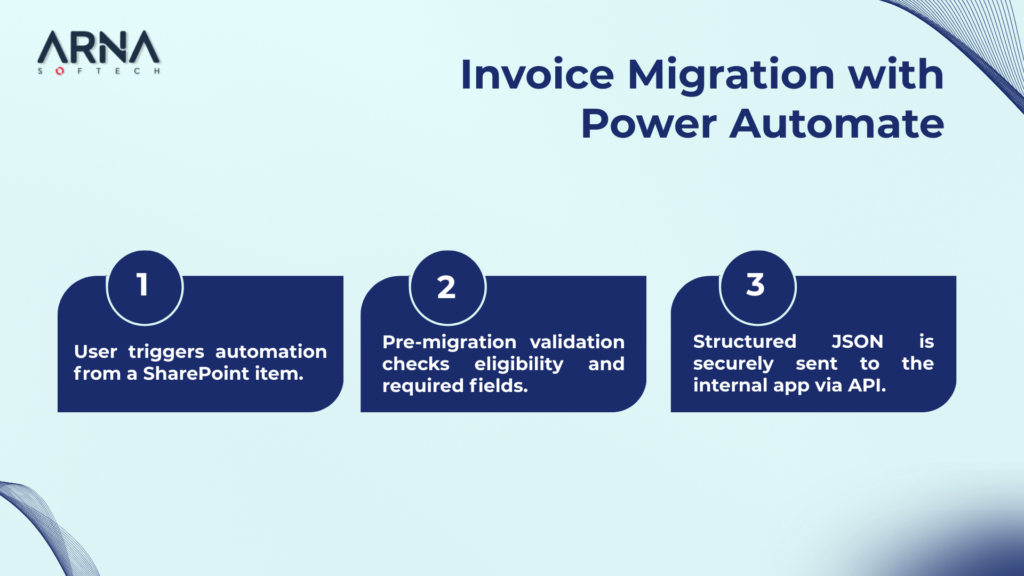
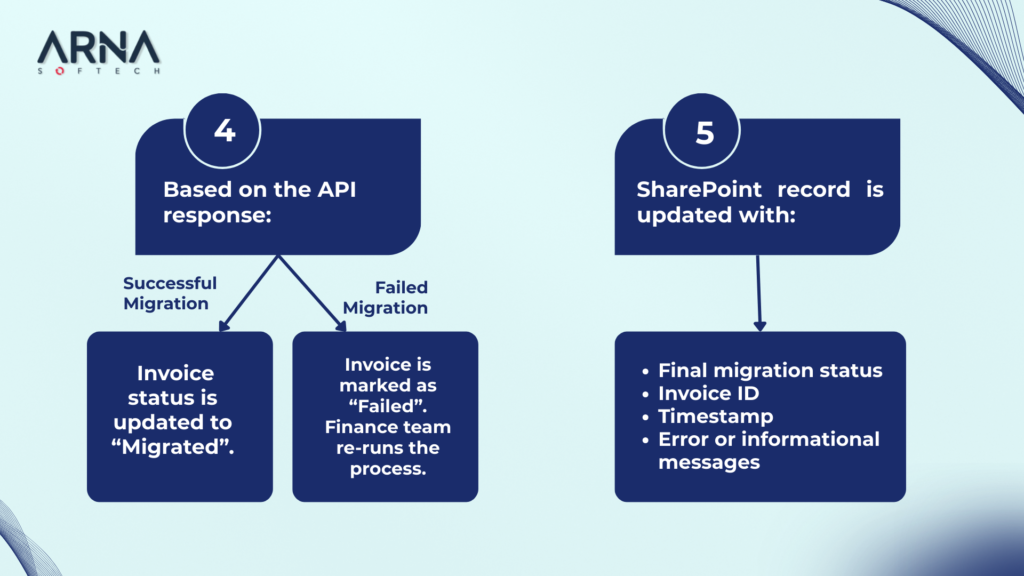
What changed when we used Power Automate for workflow automation? Processing that once demanded minutes of manual effort is now just a matter of some clicks. The quality of the data transferred has improved. The finance team no longer has to depend on IT to resolve migration problems.
What is a Finance Workflow?
A finance workflow is the series of steps your team follows to complete a financial task. For example, reviewing an invoice, approving it, and recording it properly. It’s simply how financial work moves from one phase to the next.
What is the Automation of a Finance Process?
Finance workflow automation is about reducing hands-on work by letting software tools manage repetitive tasks that don’t need constant human involvement.
How to Use AI to Automate Finance Tasks?
There are many finance areas where AI can be helpful. It can be used to read invoices, catch unusual transactions, and predict cash flow. AI can also be used to generate financial summaries and draft basic reports automatically.